Azure: The Outline Display Typeface for Modern Design
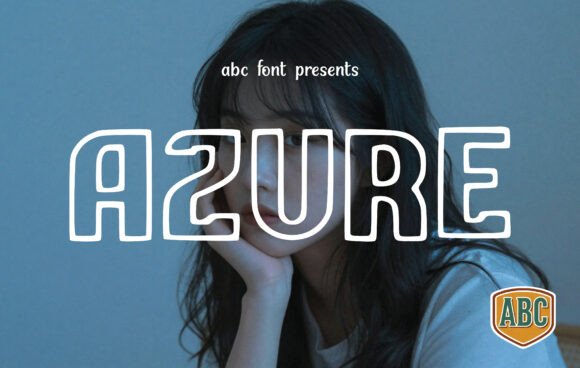
When you're building a visual identity, the font you choose does more than just display words—it sets a tone. It communicates personality before a single sentence is read. Enter Azure, an outline display typeface designed for projects that need a blend of friendliness and visual impact. This isn't a quiet, background player. Azure steps forward with a soft, approachable energy, built on thick, rounded borders and a unique "hollow" or outlined structure.
Think of it as typography with a sense of playfulness. The Azure typeface uses geometric charm and a bold, inflated feel to grab attention without being aggressive. Its rounded forms feel modern and youthful, making it a standout choice for designers, entrepreneurs, and creators who want to inject a dose of fun and confidence into their work.
Where Azure Truly Shines
The strength of a premium font like Azure lies in its specific applications. It's not a one-size-fits-all solution for body text, but as a display font, its potential is vast. Its outlined nature makes it particularly effective for layered designs. Imagine using Azure for a headline, with a vibrant color filling the negative space, or overlaying it on a photographic background where the image shows through the letterforms. This creates a dynamic, high-impact visual that's perfect for the fast-scrolling world of social media graphics.
For brand identity, Azure communicates innovation and approachability. A streetwear label could use it to convey a bold, contemporary edge. A children's educational app might leverage its friendly geometry to feel welcoming and safe. It’s an excellent candidate for logo design where memorability and personality are key. Beyond digital, think about packaging design for artisanal snacks or trendy beverages—the outlined style can make a product pop on a crowded shelf.
In editorial design, use Azure for chapter titles or pull quotes in a modern magazine layout. For web design, it can create striking hero section headings or call-to-action buttons that users can't ignore. Its visual weight ensures it stands out even when surrounded by other elements.
Practical Guidance for Using Azure Effectively
Adopting a creative font like Azure requires a bit of strategic thinking to ensure it enhances rather than hinders your project.
Evaluating Project Fit: First, ask if your project's personality aligns with Azure's. It conveys modernity, playfulness, and confidence. If your brand is ultra-serious, traditional, or requires extreme formality, a different typeface might be more suitable. For everything from a vibrant blog header to a dynamic event poster, it's worth considering.
Mastering Font Pairing: Azure's bold personality needs a partner that lets it take center stage. The best practice is to pair it with a clean, minimal sans serif font for body text. Think of fonts like Inter, Poppins, or Montserrat. This contrast creates a clear visual hierarchy: Azure shouts the headline, and the sans serif calmly delivers the supporting message. Avoid pairing it with another ornate display font, serif font, or script font unless you're going for a very specific, eclectic look that you can test thoroughly.
Readability and Hierarchy: As an outlined font, Azure's primary role is for short, impactful text—headlines, logos, single words, or short phrases. Its readability decreases at small sizes or in long paragraphs. Always use it for high-level headings. Ensure there is sufficient contrast between the outline color and the background. The hollow center can be filled with color or left transparent, but test both options to see which provides better legibility in your specific context.
Reviewing the Asset: When you acquire Azure as a commercial font, examine the full package. Does it include multiple weights or styles? Check for OpenType features like alternate characters or ligatures that can add extra flair. Understanding the licensing is crucial—ensure it covers all your intended uses, whether for client work, merchandise, or digital products.
Real-World Application Scenarios
- For the Entrepreneur: Use Azure in your brand identity for a tech startup or a creative studio. It makes your logo instantly recognizable and conveys a forward-thinking, user-friendly vibe. Apply it consistently across your website headers and pitch deck titles.
- For the Content Creator: Create a series of social media graphics with Azure as your signature headline font. Its outlined style is perfect for creating engaging Instagram story polls, YouTube thumbnails, or podcast cover art that stands out in a feed.
- For the Small Business Owner: Design eye-catching in-store signage, sale posters, or menu headers for a café or boutique. The font's friendly boldness is inviting and can highlight key information effectively.
- For the Hobbyist or Crafter: Azure can elevate personal projects. Use it for digital stickers, party invitations, custom t-shirt designs, or scrapbooking titles. Its playful character adds a professional touch to DIY creations.
Choosing a modern typography asset like Azure is about adding a specific tool to your design toolkit. It won't replace your go-to sans serif font for body copy, but for those moments when you need a headline to have personality, energy, and a touch of inflated fun, it's an invaluable design asset. Test it in context, pair it wisely, and let its friendly geometric charm work for your next project.